🔒 Patreon Special

IT Pros: exclusive shows await you on Patreon, focusing on the more challenging aspects of running your practice and working with clients and employees.


243: Star Belly & Plain Belly Sneetches

Topics:

Watchman-Monitoring-logo-1-color.png

We're sponsored this week by Watchman Monitoring, a favorite tool of ours that should be in every professional consultant's toolkit.

Visit WatchmanMonitoring.com/cmdctrlpwr and sign up for your free trial to find out how Watchman Monitoring can keep an eye on your client machines and notify you of over 100 issues. Be sure to tweet @cmdctrlpwr #CCPsentme to support the show!
pic.jpg

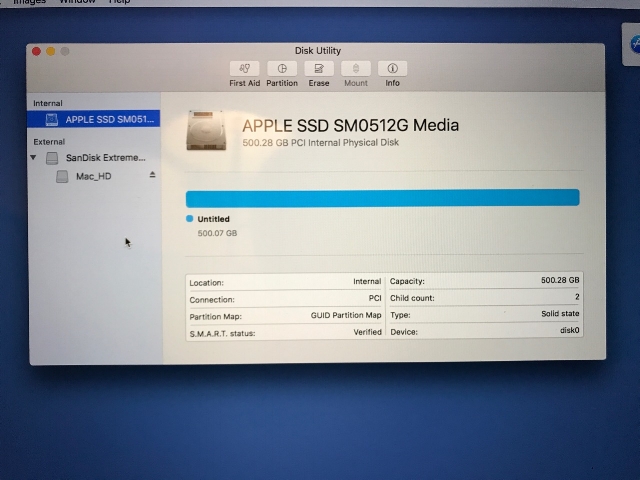
-Jerry humbly shares a story of formatting the wrong drive while preparing new external installers and things to watch out for in APFS volumes when booted from HFS+

-Joe almost attempted a migration to Sierra from High Sierra when setting up Judy's new computer

sneetches.png

-Jerry compares HFS+ to APFS issues to the Dr. Seuss Sneetches

-Sam shares his latest experience with Daylite and how he has seen the power of the product.  Our own Jerry Zigmont can help!
http://www.daylitemac.com
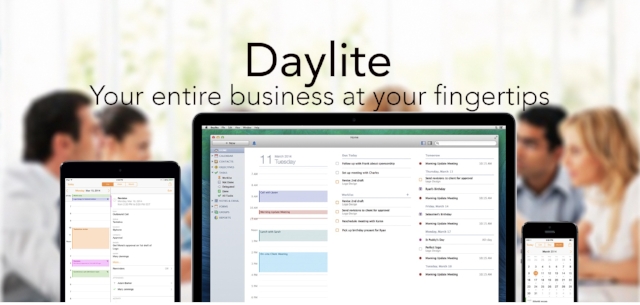
 

-This leads into a further conversation about Daylite as a product and methods of integration

-Joe has frustrations about Microsoft's auto update.  It provides a perfect opportunity to discuss our friends at Addigy

-Jerry talks about some of his non-public facing websites to try and make things easier for his clients.  But as it turns out, it ends up creating frustration.

-The group compares MSP models and how they all operate slightly differently

-Joe was listening to the mac catalog and has some followup from episode 231: “Grant BigLanik Easy Access” re: Amazon Gift Cards: very annoying, resulted in having to use AirPlane Mode to finish a recipe for Curried Butternut Squash and Pear Soup on AllRecipes.com. (Joe misstated this as SimplyRecipes.com in the podcast. The Editor regrets the mistake.)
 

Client Static IP Services Loyalty.png

242: Goals For 2018 With Weldon Dodd of Rewind Tech - Denver, CO

Topics:

WeldonDodd-sm.jpg

Weldon Dodd of Rewind Technology joins us for another episode
https://rewindtech.com

-Weldon asks the crew about New Year's resolutions and the conversation immediately delves into a discussion on Wi-Fi

-Eero is a recommendation Weldon has been using in a lot of residential environments.  Joe & Jerry have similar positive experiences:
https://eero.com

-Cisco Meraki is what Rewind Tech usually turns to for continued management of a network:
https://meraki.cisco.com

-Weldon discusses his 1, 3, 5, 7 plan (Software - every year, endpoint equipment (laptops) - 3, servers - 5 years, networking equipment - 7 years)

-Sam is starting to evaluate Daylite as a CRM and sees many possibilities for use within his organization.  Still, the discussion of a good old fashioned spreadsheet comes about.
https://daylitemac.com

-Weldon discusses the future of his training and MSP business as well as his role within the organization

-2018 goals for Weldon: creating and utilizing custom DEP deployment solutions since the future of imaging is changing. Ultimately he wants a great experience for the customer.  Here are some of the tools that he is looking into:

The ability to create macOS packages to deploy user accounts
https://github.com/gregneagle/pycreateuserpkg

DEP deployment tools:
https://github.com/Shufflepuck/SplashBuddy 
https://gitlab.com/Mactroll/DEPNotify
https://github.com/erikng/installapplications

-Tim Perfitt from Two Canoes discusses acquiring a new iMac Pro and the changes that come with it: https://twocanoes.com/secureboot-imac-pro/

-Another great resource mentioned from Scripting OS X called NetInstall Is Dead, Too: https://scriptingosx.com/2017/12/netinstall-is-dead-too/

-Weldon takes a few moments and acknowledges the fellow members of the Mac community

-Have a great 2018!

236: MacBook Pro - Turn Back Time

Topics

  • Root login issue

    • needs catchy name... “Higher Sierra. Even Higher Sierra? Too High Sierra...”

    • Joe wonders if FileVault was affected, assumes not. Probably need to log into existing user account first. From Addigy's email: "Gaining access to user accounts and turning off FileVault encryption"

    • ARD was susceptible. (Another reason not to forward ARD/SSH port from WAN to LAN!)

  • Our friends at Addigy put out an immediate fix: https://www.addigy.com/fix-the-high-sierra-root-exploit

  • Clients ask, "should I update to the new macOS?" We usually recommend waiting a few months, especially with the major filesystem changes in High Sierra. Our previous best practice was to recommend waiting until the 10.x.3 update. Should we go back to that recommendation? Note that the issue existed in the current beta of 10.13.2 in addition to the latest release of 10.13.1.

    • The sweet spot of macOS releases: 10.x.3 - 10.x.n

    • Note the latest release of each macOS version, e.g. 10.5.8, 10.6.8 v1.1, 10.7.5, 10.8.5, 10.9.5, 10.10.5, 10.11.6, 10.12.6, etc.

  • Sam talks about "winging it" with a product he used to support - Canto Cumulus

  • Jerry starts a good discussion about the current lines of MacBook Pro models and the changes that have not been well received. He mentions Marco Arment's blog posts
    -The best laptop ever made: https://marco.org/2017/11/14/best-laptop-ever
    -Fixing the MacBook Pro: https://marco.org/2017/11/24/fixing-the-macbook-pro

  • Joe has some follow up on removing the Temp user account when the minus button is not available: you can also use Directory Utility. Open Directory Utility, authenticate as the Temp user, then remove the Temp user. Verify Temp user has been removed in Users & Groups, then manually delete home folder of Temp user. Note that we also tried changing the user's password from within the existing user (to avoid keychain issues) and it didn't work.

235: The Lazy Man Migration Assistant

TOPICS:

• Joe wonders: how many clients have gotten the wrong impression when you give them the recommendation "Just use 1Password.”

foto-wtf-mac-grande-starbucks.jpg

• iLugger: https://www.ilugger.com/

• Joe reveals another boneheaded move during his company's email migration – learn from his mistake! He exported contacts to a vCard file, but forgot to turn on Export Notes in Contacts app preferences

• CodeTwo Exchange Sync
https://m.codetwo.com/exchange-folder-sync

• The Mac CRM & Project Management app trusted by busy teams.
https://daylitemac.com

• thanks to listener Tim Hannon for the courteous correction about the pronunciation of patron Steve Sorbo's business name, Mac SOS

RAMDoubler.jpg

• Resolve issues caused by changing the permissions of items in your home folder
Repair Permissions - https://support.apple.com/en-us/HT203538

• how to enable Apple Remote Desktop (ARD) using the kickstart command on the command line:
https://support.apple.com/en-us/HT201710

Screen Shot 2017-10-27 at 9.23.55 AM.png

• Joe walks through his process of migrating data to a new iMac running High Sierra, which provided validation for many consultants best practice for a successful migration. The Migration Assistant built into Setup Assistant didn’t work even after repairing the source drive, rebuilding the source disk directory, letting it calculate the space needed for all items first, etc. Creating a Temp user account, installing all software updates on the destination machine first (just iTunes in this case), and perhaps most importantly using Migration Assistant in the Utilities folder is what finally yielded a successful migration

• Joe offers a bonus migration tip. If you're unable to delete a user account in High Sierra, this helped, surprisingly: https://discussions.apple.com/thread/8087348?start=0&tstart=0

233: If I Could Turn Back Time

November 7, 2017

TOPICS:

- Sometimes sharing music in Apple Music using Messages doesn't work. Workaround: use "Copy" or maybe AirDrop works

- Discussion surrounding Apple Music, iTunes Match and streaming music.

- SpaceX lands rocket at sea, makes history - https://www.youtube.com/watch?v=lEr9cPpuAx8

- followup on Joe's migration to G Suite: I've stopped seeing progress bars and large numbers counting up and down in my sleep, and I've stopped having nightmares about drag and drop targets
SHARED CONTACTS FOR GMAIL - https://www.gmailsharedcontacts.com

 when cleaning up old mail using your IMAP client with Gmail:

1) "When I mark a message in IMAP as deleted": change to "Auto-Expunge off - Wait for the client to update the server."

2) When a message is marked as deleted and expunged from the last visible IMAP folder: change to "Move the message to the Trash"

3) Under the Labels section, remove the check mark next to All Mail and Important so that those labels will not show in IMAP

- Sam tells about a client sending out bulk emails and wishing to set up their own email server.

- Joe Share his thoughts on his new iPhone X

- Sam shares a story about declining service to a potential problem client.

- Joe shares a story about helping a client hide selfie photos
ImageOptim makes images load faster - https://imageoptim.com/mac

- We'd like to thank all of our Patreon sponsors for their tremendous support of Command Control Power. You really help make the show possible. We've talked about burnout recently... This show has been a labor of love, and your support sends a signal that you appreciate what we're doing so it really helps encourage us to keep doing it and putting out a show every single week. We've released over 232 episodes over the course of the last four years! We really appreciate all 40 of our patrons. For this monthly live episode, we'd like to specifically thank those patrons that pledge at a certain level. You truly make the show possible and we really appreciate it.

-A big thank you to all of our Patreon sponsors!

-A big thank you to all of our Patreon sponsors!

231: Grant BigLanik Easy Access

October 24, 2017

TOPICS:

• shout out to longtime supporter Kevin Ginger of kGinger Consulting

• Thanks to longtime listener Dave Provine for some followup: "The solution to /private/var/folders is to be sure not to delete the *zz* folder inside. You can vaporize everything else, and the *contents* of zz, but leave the zz folder in there (or recreate it)." See also the show notes from Episode 182: "Tell Me About The Cloud" and Episode 191: "Cause & Effect"

• Sam shouts out from the JNUC Conference in Minneapolis, MN.

• Jerry and Joe share parallel stories dealing with MacBook Pro failures while under our care

• Jerry recounts three recent calls where clients claimed they were “hacked”, including installing a profile on an IOS device via this weather site

http://myaccurateforecast.com

https://www.dropbox.com/s/wjwt7c48guzg97g/MyAccurateForecast_com.pdf?dl=0

BigLanik.jpg

• Jerry shares a TeamViewer vulnerability regarding previous installation of the Team Viewer app on a PC

• Jerry has a recent incident where a residential clean 2012 MacBook Pro Retina massively fails during updates.


• Joe recounts his MacBook Pro Repair for a business client and teh conversation centers around responsibilities and trust.

• Finally Joe and Jerry wind up discussing problem clients and how to terminate the relationship.