🔒 Patreon Special

IT Pros: exclusive shows await you on Patreon, focusing on the more challenging aspects of running your practice and working with clients and employees.

Join us on Patreon

283: The Mile High jamf Club - Interview With Weldon Dodd Of Rewind Tech

Topics:

Weldon.png

-We welcome back Weldon Dodd of Rewind Tech to the show. Weldon was kind enough to put Sam up and host him in his training space in Centennial, CO

-Joe has a correction from listener Justen Wattenberger in the way he pronounces and writes Mojave

rewind_training.jpg

-In Joe’s latest feature request corner, he wants to see shared favorites. Sam would like shared contacts.

-Joe quizzes us on the domain 1e100.net (hint: it is owned by Google)

-Sam addresses the rumors about how he spends his CCP per diem and where he sleeps at night

-Weldon gives us the scoop about his business and how it involves MSP clients as well as an Apple Authorized Training Partner

-Weldon begins a conversation about how to onboard new employees and the team shares their thoughts

-One of the methods that Sam used was to have the new hire document your steps so he/she learns how to create documentation and you get to critique the way they create notes

-Joe has a client that he respects that gave him good unsolicited feedback on his new hire. She became a barometer and may be a future method for vetting potential new employees

-Weldon compares that to a situation where he was brought on board to help vet a new educator being brought into his son’s school

-Sam has a bone to pick with Joe about a new client referral that he cannot shake

-On the topic of referrals, Weldon talks about his good business relationship with Amy McKnight and the team at The Mac Spa

-Joe asks Weldon about his decision to go all in on MSP and how difficult it was at times to say no to potential business

-After heavy experience with companies like Microsoft and Cisco, Weldon realized he was the only one on his team that could handle certain tasks. So it made him sharpen his focus on things that he and his entire team could be awesome at.

-A big congratulations to Weldon for his successful presentation with Randy Saeks at JNUC 2018!

-ACEs Conference is back for 2019! It will be held in Kansas City, MO June 4-6. Visit http://acesconf.com/ccp/ for special pricing for CCP listeners.

282: Interview With Allen Hancock of Watchman Monitoring - Zendesk Private Ticket Creation

Topics:

1457304047972.jpeg

This show is brought to you commercial free, thanks to our Patreon sponsors.

On this episode we welcome long time supporter of the show and owner of Watchman Monitoring, Allen Hancock

-Some news for Allen and the team is that they have hired Ben Mason. You may know Ben from his excellent support at Gruntwork.

-Hiring new staff and remote vs local employees becomes an interesting topic of discussion

-Allen has a big announcement in that they are changing the way they handle Zendesk Tickets. Listen to find out more about Zendesk private ticket creation and how Watchman Monitoring takes full advantage of this.  

-Watchman Monitoring can also work with Zendesk’s Essential Plan

-Zendesk Private Ticket creation is the new feature that allowed this integration to happen

-Looking for help with these features?  Watch the Watchman Monitoring webinar 

-If you need quick assistance, visit http://watchmanmonitoring.com/schedule to set up a time for support.  Pro Services options are available as well.

-Allen will be in Los Angeles for MacTech Conference 2018
Visit http://conference.mactech.com/go/ccp to find out about special pricing for CCP listeners

-The Watchman Monitoring community forum has been recently revamped.  You will no longer receive emails from the forum unless you request to watch a topic or receive responses to your posts.  You can also vote on features.

Visit http://community.watchmanmonitoring.com to be a part of the Watchman Monitoring community. Get involved!

264: On The Road With Joe Saponare

OTR2.jpg

Topics:

-Joe is reporting from the streets of Boulder Creek, CA #vanlife

-Joe talks about the unglamorous life of living in a camper (down by the river)

-He actually references Marco Arment discussing camper stories on Accidental Tech Podcast: http://atp.fm

-Cellular difficulties creep up as Joe discusses using his cellular modem

-As a board member of a non-profit, Joe discusses his ability to score an unlimited data plan with Sprint: mobilecitizen.org

-Joe's transition has been surprisingly smooth after going on the road, largely due to his staff at PsiMac

-The disasters of Kerio / GFI are brought up once again

-Both Joe and Jerry have hosted CrashPlan PROe for clients.  Joe is slowly migrating his users to BackBlaze.  Jerry has decommissioned his PROe server.

-Since the root level Library is excluded from BackBlaze by default, Jerry provides a solution to use Carbon Copy Cloner to copy the data to the Documents folder, which would then be backed up.

-Joe's MacBook Pro had a bit of damage when purchased from a client.  Now it is reporting "service battery".  After deciding to send it to depot for repair, he shares his dealings with the process.

-As Jerry comments on Joe's name dropping in California, Joe recalls the SNL sketch called "The Californians" https://www.youtube.com/watch?v=2jIBZjL8G5s

255: Live April Show - Deep Down In A Bunker In Switzerland

We welcome our new VIP Patreon sponsors:

Zvon Petric - At Your Server

Zvon Petric - At Your Server

Topics:

-Jerry has an amusing client story about a lost password and how he put Addigy to good use

-Speaking of passwords, Sam describes an uncanny story about how an Apple employee guessed a user's password out of thin air

-Sam describes a story of how a client was scammed via email for over $200,000.  It calls to mind that Ubiquiti was similarly the victim of an email scam to the tune of $47 million dollars!  
http://fortune.com/2015/08/10/ubiquiti-networks-email-scam-40-million/

-Two possible options for secure mail:
Proton Mail: proton.me, formerly protonmail.com
Mimecast: https://www.mimecast.com

-Joe encounters an interesting startup message in verbose mode: "Too many corpses being created"

-One of Jerry's clients has some issues with spam filtering with Only My Email and directing messages to Fast Mail

-Is long propagation time still a thing?

-GFI sucks! - According to Joe's experiences.  Media Temple isn't much better.
Go to status.gfi.com and view the history to have a laugh

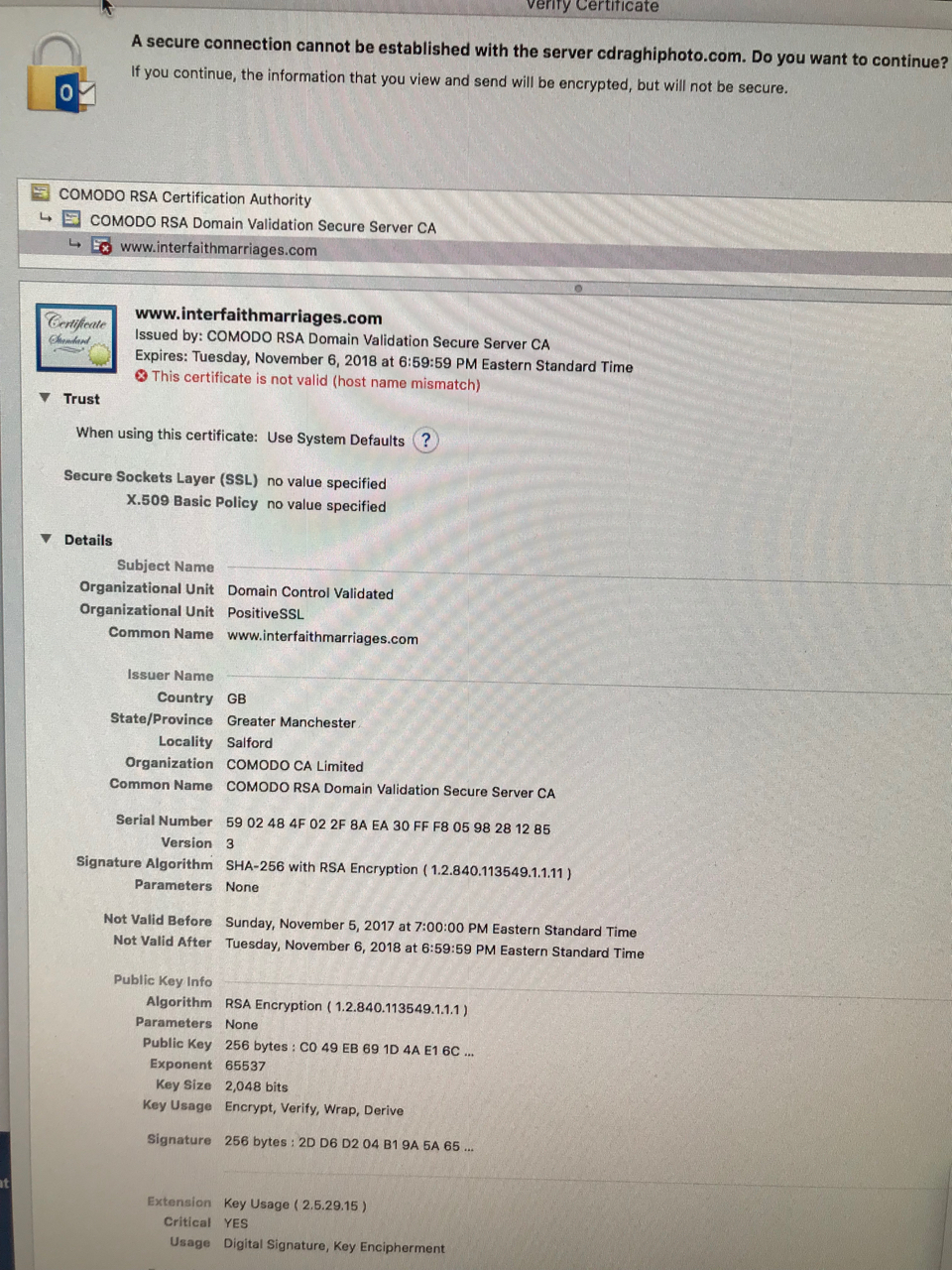
-Jerry has an interesting experience with Sherweb where a certificate trust dialogue box appears for a client's email...

IMG_2572.jpg

-Microsoft Remote Connectivity Analyzer: https://testconnectivity.microsoft.com

-Sam runs across a situation where copying files using the Synology GUI was unbearably slow.  He ended up enabling SSH on the Synology and used a host Mac to initiate an SSH connection and utilitized the cp command:
cp -pr /source/directory/ /destination/directory/

-ACEs is just around the corner and the group shares some great quotes from previous attendees.  If you haven't already, sign up for ACEs today!

-Sam & Joe have a secret meeting at PsiMac World Headquarters

-Joe spins a yarn about calendar invites and an Apple ID, Google Calendar, and Microsoft Exchange, oh my!

253: Interview with Justin Maxwell of Smith.ai & Keypad

JustinMaxwell.jpeg

Justin Maxwell of Smith.ai and Keypad joins us for an incredibly informative and in depth interview.  Most recently the design lead for Google’s Android Auto, Justin has designed products and built teams for Google, Apple, Mint (Intuit), Sony, and plenty of startups along the way.  Here are two of Justin's offerings that we discuss on Command Control Power:

-Smith.ai is a superior call answering & intake service for small & solo businesses. Their live, U.S.-based virtual receptionists capture & qualify leads, book new clients, and build better relationships with your existing clients.

-Keypad is the most advanced & affordable cloud phone system for small businesses.  Keypad offers call routing, call analytics, and many customizations to help you track your performance, and convert more leads.

-Justin takes us through not only the story of how he brought these businesses to life but his life at Apple as an interaction designer for Apple.com

-As we talk Smith.ai, Justin describes the look and feel of the site and how it relates to their customers

-Smith.ai acts as your virtual receptionist, to provide a layer between customers and your business.  At the same time, they are able to weed out all of the spam or unnecessary calls.

-Justin was mint.com's first UX hire and gave him good perspective on small businesses and their needs

-Their team essentially followed around small businesses over the course of a Summer to figure out what their needs were and what they found was that phone calls were the biggest pain point

-Instead of being a brick & mortar company, they utilized VoIP technology and highly skilled employees working from their locations

-"It all starts with a phone call"

-Jerry can't imagine running his business without Smith.ai at this point.  Even just not having to answer calls at client sites to try and make a sale

-Smith.ai's system uses machine learning to help the receptionists make the right decisions over the course of a call and provide the correct answers, versus reading from a script

-Joe & Justin discuss their easy to understand pricing as opposed to minute based pricing

-Keypad is an excellent complement to the Smith.ai service.  Instead of using services like Ring Central, Google Voice or Grasshopper, which can add latency to a call, they developed Keypad.

-You can sign up for the beta of Keypad here

-Simplicity is a focus of Keypad because of feedback the team has received about similar service offerings

-Justin discusses analytics to understand when volume is high or knowing when you need additional support

-Jerry mentions a possible higher tier offering for VIP support and how to tie it in to our monthly services plans

-Joe signs up right here on the show!

-Look out for service offerings in the chat space from Justin's team

252: Migrate Is Becoming A Trigger Word For Me

Topics:

-Joe has some follow up for same from Episode 223 "It's not you, it's me" about Mail notifications

-Sam follows up on his experience at the ACN Road Show in Santa Monica, CA

-Sam shares a story from one of our listeners that recovered a stolen MacBook Pro with assistance from the police department

-In working with a client, Joe discovers that Find My iPhone was off.  He also discussed enabling show last location, which is a handy feature.

-Sam tries to inject a new segment in the show, "Sam's travel corner"

-Jerry reminds us about taking a few moments to ask clients for an online review

-Jerry talks about an experience with a client that had a failed High Sierra upgrade - "macOS could not be installed on this computer" and used terminal to correct it:
diskutil list
diskutil umount force /dev/disk1
(Take note of your disk id. disk1 in my case)
diskutil apfs convert /dev/disk1

macOSerror.png

-We reference Mike Bombich from Carbon Copy Cloner and an APFS issue that was found when dealing with sparse images:
https://bombich.com/blog/2018/02/15/macos-may-lose-data-on-apfs-formatted-disk-images

-Not to be outdone, Joe introduces yet another segment, "Joe's Kuriosity Korner"

-A client that politely declined Joe's monthly services plan ends up with an issue with data loss after a liquid spill and the Apple Store replaced hardware.  PsiMac to the rescue: had her order the hard drive from Backblaze. It contained a full copy of her home folder, which brought her data back.  Two fallout issues were Keychain related and the Photos library.  

-Sam has an issue with spotlight and Outlook 2016 and found a more recent support article to deal with the issue using the mdimport command.  This was a welcome new approach to removing and rebuilding the spotlight database:
https://support.microsoft.com/en-us/help/2741535/outlook-for-mac-search-returns-no-results-and-task-items-are-not-displ

-A story you have to hear to believe - Joe's client has an issue with sending emails from Outlook and coming out as gibberish to receivers.  After upgrading from Outlook 2011 to 2016, the issue remained.  In the end, an errant carriage return in one of her contact names caused this formatting issue to occur.

"Just re-index it dude" 
-Apparently Sam