🔒 Patreon Special

IT Pros: exclusive shows await you on Patreon, focusing on the more challenging aspects of running your practice and working with clients and employees.


193: Uncle Jimmy's Search Bar & Selfie Of Ulysses

193: Uncle Jimmy's Search Bar & Selfie Of Ulysses
Joe Saponare, Sam Valencia, Jerry Zigmont

Are there any CCP listeners out there that are not a members of the Apple Consultants Network? We would love to hear from you. Tell us your story!

Topics:

Joe gets a juicy emergency support job and shares the details with us.  It brings about a discussion on surcharges and fees.

Friend of the show David Sparks comes up in conversation as the guys kick around details of contract agreements with clients.

The age old MSP & billing discussion gets kicked around, as it does on occasion.  

While on the topic of the MSP model, we all chime in about an incredible product to manage your fleet of Macs, Addigy.  Give it a test drive by visiting http://www.addigy.com/cmd-ctrl-pwr

Sam brings up a "break/fix" client that wants immediate responses but doesn't want the commitment.

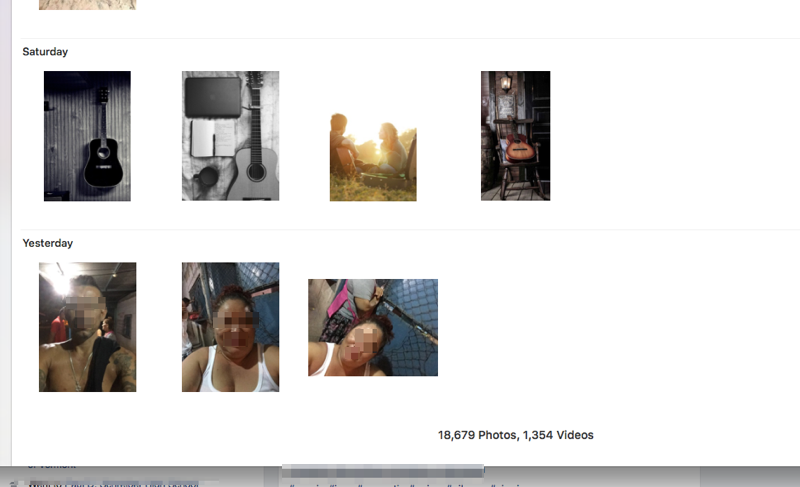
Sam shares an almost unbelievable story of a client that had random photos appear in her Photos library only to find that someone had been signing in to an iPhone using her Apple ID (photo below).

188: Interview With Jason Dettbarn / Founder & CEO of Addigy - Cloud Based Mac Management Platform

188: Interview With Jason Dettbarn / Founder & CEO of Addigy - Cloud Based Mac Management Platform
Joe Saponare, Sam Valencia, Jerry Zigmont

CCP proudly welcomes Jason Dettbarn, founder & CEO of Addigy, a Cloud Based Mac Management Platform.  Addigy simplifies and streamlines the IT management of your Macs by providing a comprehensive approach to security & management for macOS.

Jason, who obtained his Masters in Computer Science, worked for a few big players like CA and Kaseya before leaving to start Addigy in May of 2014.  Take a listen as we dive in deeper with Jason to learn about why he started Addigy and why it fills a void in RMM (Remote Monitoring & Management) support for the Mac.

Sign up for a free trial with Addigy: https://cmdctrlpwr.addigy.com/signup

182: Tell Me About The Cloud

182: Tell Me About The Cloud
Joe Saponare, Sam Valencia, Jerry Zigmont

Recorded  November 15, 2016

Jerry revisits thin iMac upgrades and procedures.  He offers some “pro tips” based on his experiences and what he has learned from Sam’s mistakes.  He highly recommends the Anker USB 3.0 to SATA 3ft Converter Adapter Cable:
https://www.amazon.com/Anker-Converter-Adapter-Cable-included/dp/B005B3VO24

Jerry and Joe discuss an interesting special consideration when upgrading a 13-inch MacBook Pro 2011: see OWC's original blog post and followup; Joe has had good luck using OWC's thermal sensor cable in all iMacs since 2009; we've previously used SSD Fan Control with good results, but generally prefer a hardware solution.

Jerry recounts a Contacts issue he was having with iCloud and third party contact syncing.  He uses the opportunity to quiz the CCP crew on the issue. 

Sam is currently struggling with an issue related to syncing his own calendar data ever since upgrading to Sierra.

Joe has a tough go trying to watch Netflix on his Apple TV and airs his frustrations.

After cloning, Jerry hits an odd issue with Apple Remote Desktop refusing to launch:
https://discussions.apple.com/message/30474023#30474023

181: Solutions For The Apple Consultant / LSD- What A Long Strange Trip Its Been

181: Solutions For The Apple Consultant / LSD- What A Long Strange Trip Its Been
Joe Saponare, Sam Valencia, Jerry Zigmont

Recorded live on November 7, 2016

- Enjoy Command Control Power and want more commercial free programs? Please visit our Patreon Page where you can support Command Control Power and help us bring you more commercial free programming.

- Synology File Server Solution  
Network Attached Storage Product Selector - https://www.synology.com/en-us/support/ nas_selector

Synology "Disk Station" Operating System - https://www.synology.com/en-us/dsm/6.0/features

- Ubiquiti Enterprise WiFi System
Ubiquiti Networks UAP-AC-PRO-5 UniFi Access Point Enterprise Wi-Fi System
http://macs.ws/2bYGLlc

Ubiquiti Networks US-48-750W UniFi Managed PoE+ Switch
http://macs.ws/2cCnN9f

Ubiquiti Networks UniFi Cloud Key B&H # UBUCCK MFR # UC-CK  
http://macs.ws/2bYH1AN

- Joe's positive LSD story:
A Possitive LSD Story on The News - Bill Hicks on Drugs.

iMac 27-inch Retina 5K initially failed to log into user, finally logged into user but app icons were generic, apps wouldn't open, system very slow; after deleting user account, preserving home folder, and then recreating user account and reclaiming home folder, the user account would log in and work properly but system wouldn't restart or shut down, getting stuck on black screen with arrow cursor; system log showed repeating messages about com.apple.lsd process crashing; tried safe boot and re-installing 10.11.6 with no luck; tried rebuilding LaunchServices using the following command with no change:

/System/Library/Frameworks/CoreServices.framework/Versions/A/Frameworks/LaunchServices.framework/Versions/A/Support/lsregister -kill -seed -r

Thanks to Apple discussion forums, Joe learned a command to list the open files associated with a given process:
pgrep -u `id -u` lsd | xargs slof -p
which listed a file in /private/var/folders/kv/2kk40mdv5wdccq6hb7y3rgk80000gn/0/com.apple.LaunchServices-134501.csstore

Deleting that file didn't work, but after researching whether it was OK to delete folders in /private/var/folders/, Joe deleted everything inside /private/var/folders/ and restarted. Sure enough, the system restarted successfully and has worked properly ever since. 

 

179: No Followup

179: No Followup
Joe Saponare, Sam Valencia, Jerry Zigmont

Recorded  on October 31, 2016

- Enjoy Command Control Power and want more commercial free programs? Please visit our Patreon Page where you can support Command Control Power and help us bring you more commercial free programming.

173: A QuickBooks Kobayashi Maru

173: A QuickBooks Kobayashi Maru
Joe Saponare, Sam Valencia, Jerry Zigmont

Recorded September 13, 2016

We're sponsored this week by Watchman Monitoring, a favorite tool of ours that should be in every professional consultant's toolkit.

Visit WatchmanMonitoring.com/cmdctrlpwr and sign up for your free trial to find out how Watchman Monitoring can keep an eye on your client machines and notify you of over 100 issues. Be sure to tweet @cmdctrlpwr #CCPsentme to support the show!

TOPICS:

- The CCP crew begins the show sharing some distant and recent client “fails”.

- The Kobayashi Maru is a training exercise in the fictional Star Trek universe designed to test the character of Starfleet Academy cadets in a no-win scenario. The Kobayashi Maru test was first depicted in the opening scene of the film Star Trek II: The Wrath of Khan and also appears in the 2009 film Star Trek. Screenwriter Jack B. Sowards is credited with inventing the test. The test's name is occasionally used among Star Trek fans or those familiar with the series to describe a no-win scenario, a test of one's character or a solution that involves redefining the problem.

- latest QuickBooks 2016 (R6) update requires El Capitan whereas previous versions of QuickBooks 2016 would run on Yosemite; kind of bad timing to do this right before a major macOS update, since El Capitan may no longer be easily downloadable after Sierra is released

- 146: Upgrading Late Model iMac's with JD Strong of Strong Solutions http://commandcontrolpower.com/podcast/2016/3/12/146

- iMac Intel 27" Retina 5K Display Adhesive Strip Replacement This is the kit you need to open and remove the glass along with strips to re-glue the panel back on the chassis.

- Recommended Samsung EVO SSD Drives - http://amzn.to/1QPDG7H

- Cindori Trim Enabler  https://www.cindori.org/software/trimenabler/

- SSD FanControl (free) - http://exirion.net/ssdfanctrl/

- Macs Fan Control (free) - http://www.crystalidea.com/macs-fan-control

- Discussion regarding different ways to mange task and systems for remembering items “to do"