🔒 Patreon Special

IT Pros: exclusive shows await you on Patreon, focusing on the more challenging aspects of running your practice and working with clients and employees.


337: These HEViC Files Are Wreaking Havoc

Topics:

-Joe joins the crowd in the cloud 

-The biggest issue affecting Joe in his move to the cloud is “van-width”

-An unexpected issue was dealing with his Dropbox data. Joe's PSA: Symlinks in Dropbox = no bueno.  It just got stuck "checking for changes" for days on end. Found a relevant link: “stuck on checking for changes" issue, which said that the solution was removing symlinks from inside the Dropbox folder. It included a handy command to list all symlinks in the Dropbox folder: 
find ~/Dropbox -type l -exec ls -lah {} \; 

-The old days of Mac HelpMate comes up as Joe is sifting through his Dropbox data

-A new type of filesystem link (like symbolic links and hard links) to be aware of, called a firmlink: 
https://eclecticlight.co/2019/10/13/last-week-on-my-mac-more-than-adventurous/

-Jerry is very happy to report that ClarifyIT has a beta that is 64-bit capable!

-After some finagling, Jerry finally figures out how to get Paste and match style working in the latest version of Microsoft Office

-In updating his Mail Chimp and testing with one of his email addresses, Jerry gets a random tips & tricks newsletter

-Upcoming show on marketing is an idea the CCP staff is kicking around

-Google Ads halts Jerry’s marketing plans by saying he is in violation of terms.  Getting in touch with the right people at Google turns out to be an even bigger challenge.

-Facebook and Instagram marketing can be region specific.  Or is it?

-Sam almost has a major mishap in his travels to Alaska 

-HEVC and HEIF wreaking havoc on Joe's MacBook Pro: com.apple.iLifeMediaBrowser.ILPhotosTranscodeCache in ‎⁨~/⁨Library⁩ ▸ ⁨Containers⁩ ▸ ⁨com.apple.ScreenSaver.iLife-Slideshow-Extension⁩ ▸ ⁨Data⁩ ▸ ⁨Library⁩ ▸ ⁨Caches⁩. This folder grows to consume all available disk space on his Mac running 10.14.6 Mojave.

Thank you to our Patreon sponsors!
Thank you to our Patreon sponsors!

335: Your Emergency Contacts Have Been Notified

Topics:

-Sam is off to an undisclosed location in Alaska

-As Jerry complains about Sam’s darkened contact photo, Joe talks custom contact photos

-Jerry has a head smack moment as he too, is affected by the certificates expiring for Apple’s macOS installers. Here are direct download links for macOS installers with valid certificates:
Catalina - https://support.apple.com/en-us/HT201475
Mojave - https://support.apple.com/en-us/HT210190
High Sierra - https://support.apple.com/en-us/HT208969
Sierra - https://support.apple.com/en-us/HT208202
El Capitan - https://support.apple.com/en-us/HT206886
Yosemite - https://support.apple.com/en-us/HT210717

-Joe talks about how time consuming it can be to update the installers, especially since he has multiple PsiTool drives 

-Jerry offers a tip which deals with the Expanded Control Strip (System Preferences>Keyboard>Touch Bar Shows) that overrides Control Strip settings that would appear per app

-Backblaze PSA: Business Groups have the ability to keep Version History for 1-year or Forever; this applies to external hard drives that may have been unplugged for more than 30 days for example. Thanks Dan Monge @ Mac I.T. Pros, supporter of the show. 

-BackBlaze B2 is the method Joe uses for his Synology clients.  He has found success in charging clients a flat fee based on the amount of data they have.  Jerry challenges his pricing method

-Joe vents about working with clients that don’t see the light with their IT needs

Your emergency.jpg

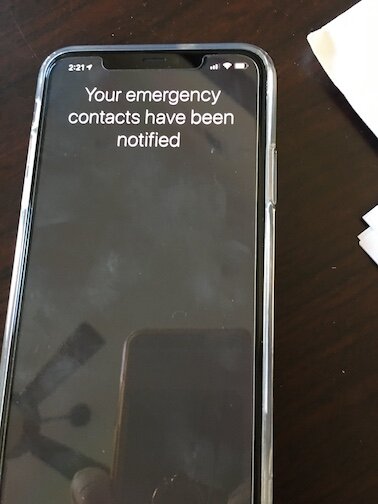
-Jerry talks about his automation setup when he connects his iPhone 11 to CarPlay.  While in the midst of a ride in his car, he has an incident where attempting to reboot his iPhone caused a 911 alert and for his emergency contacts to be notified.  Jerry researches and learns how to force restart his iPhone:
https://support.apple.com/guide/iphone/force-restart-iphone-iph8903c3ee6/ios

-Through all of this, Joe recommends going to Apple’s support article about their SOS features:  https://support.apple.com/en-us/HT208076

-Late breaking news from Jerry - Ubiquiti released their UniFi Dream Machine, which acts as a gateway, router, switch, & access point: https://store.ui.com/products/unifi-dream-machine

-Jerry really likes the Synology RT2600AC router (https://www.synology.com/en-us/products/RT2600ac).  Similar feature set but it also includes a USB port, where you can plug in a drive for network backup

-PsiMac now offers a monthly network maintenance and updates service. But he does have a PSA. He ran into an unexpected issue when testing notification emails were failing. As it turns out, he found that the “test email” button in UniFi simply doesn’t work. 

-Another PSA from Joe - he was receiving multiple notifications about UniFi devices being connected, even though they had not disconnected.  UniFi support didn’t have any reasoning so the advice is to turn that feature off at this point.

334: The Debacle Before The Debacle

Topics:

-The New York City support edition

-Sam had a sizable job in NYC and had to request assistance from Joe & Jerry

-But first, Joe discusses his upgrade to the iPhone 11 Pro and working with the dual SIM feature

-Joe finds out that it is not possible to activate an eSIM with an existing phone number

-Jerry can relate after recalling an experience with his Apple Watch

-To add insult to injury, Joe has an issue with the actual purchase transaction 

-Joe’s NYC client story is a tale of woe that has his team dealing with a network support group that operates from another country and doesn’t keep US based support hours 

-Pop quiz time as Joe reveals how to gather MAC address details from a Ubiquiti USG Pro

-Joe has a PSA about the USG Pro as well

-With the time that Joe has left to Sam, he shares a story of a big job in size and manpower that entailed backing up, wiping and provisioning roughly 200 computers in three weeks.

-Mac Deploy Stick (MDS) by Two Canoes is an excellent deployment tool that Sam explored on this job:  http://twocanoes.com/products/mac/mac-deploy-stick/

-Sam wraps up by telling a funny anecdote in corporate IT

329: DAKboard & PODMod

Topics:

-Joe is questioned by Jerry about a product that he used for many years called Statusboard for iOS by Panic https://library.panic.com/statusboard/. He has since moved to a solution that runs off a Mac mini in his office. Joe recommends products called Geek Tool & Feedwind to add dynamic calendar content that he displays for clients to see when in his office

-An excellent customizable display solution called DAKBoard https://dakboard.com/site/business is what Jerry uses for his family to run his shared calendars

DAKboard at Casa de Jerry

DAKboard at Casa de Jerry

DAKboard stock photo

DAKboard stock photo

Statusboard at PsiMac World Headquaters

Statusboard at PsiMac World Headquaters

-Jerry has an iPod eBay story to share. iflash.xyz sells boards that can be inserted into specific iPods to increase storage. He uses that along with open source software called Rock Box to play FLAC (Free Lossless Audio Codec ) files. 
https://www.iflash.xyz/store/iflash-solo/
https://www.dcsoundop.com/88-ipod-classic-sd-card-upgrade-w-iflash-xyz-adaptor/
https://www.iflash.xyz/prepare-sdxc-exfat-for-use-with-the-ipod/
https://www.youtube.com/watch?v=Q-B2DJKKSCA

-Joe & Jerry get philosophical and reflect on how technology has changed over the years

328: I am Not My Brothers Printer

Topics:

-The band is back together!  

-Jerry discusses upgrading from the iPhone 7 Plus to the iPhone 11.  He is “whelmed”

-Sam & Joe still haven’t pulled the trigger on upgrades

-A little time is spent talking about the latest product releases.  The Always On feature of the watch isn’t blowing our socks off.

-Jerry’s 2015 MacBook Pro went sideways and he had to put his skills to work on his own hardware

-An old issue that Jerry experienced before was related to Automated Device Enrollment at Setup Assistant

-Sam ran into an intriguing conundrum with blog posts created by our friends at the TidBITS Content Network
https://tcn.tidbits.com

-Joe realizes that marketing is a part of his business that he needs to incorporate more

-The practice of sending using breached password combinations to gain access to secure information is called “Credential Stuffing”.  Jerry thinks Joe is talking about Thanksgiving

-Clients sending passwords via email is nothing new but Joe reveals how it can also lead to the client paying for time to have their consultant now change their credentials.  He also discusses how you as the consultant can be tied to this bad practice.

-Jerry shows up to a client site to do a hard drive upgrade on a Mac mini.  He heads into trouble when a keyboard he brings with him does not allow him to boot in to Target Disk Mode.

-He has another story at a client site where he was troubleshooting the wrong Brother printer

Thank you to our Patreon sponsors!

Thank you to our Patreon sponsors!

327: Bob's Your Uncle

Topics:

-Sam and Joe are back after a one week hiatus

-On one of them’s latest travels, he is a fellow passenger with their flight entertainment system July Joe has a story of helping a friend with theory and their HomePod while visiting line

-Sam’s local mail truck catches fire!

IMG_8950.JPG
IMG_3758.jpg

-Joe and Sam are discuss the filters in iOS Mail app and how it can confuse end-users

-Ignoring the support ticket is a perk that Sam thoroughly enjoys

- In recent work with a local Unifi controller, Sam discovers just how easy it is to access the database and reset the admin password:
https://techreally.com/ubiquiti-controller-forgot-password/

-Sam and Joe discuss the origin of “Bob‘s your uncle”

-In what can be filed in the “I should have known this” section of the show, Sam discovers keyboard shortcuts in the calendar app that blow him away

-The new iPhone and Apple Watch models are briefly discussed and the guys kick around ideas about upgrading

-An interesting new development is the Apple Independent Repair Program: https://support.apple.com/irp-program